Understanding Email Bounce Rates — Definition, Calculation & Tips
← Referenced by 1 post
Look at the stats of your latest email campaign, and you’ll likely see something called a “bounce rate”, or “bounces”. It’s easy to overlook, but it’s worth paying attention to, especially if you see it starting to climb.
This article will explain what an email bounce rate is, how to calculate your own bounce rate, and how to improve that figure for better email deliverability.
What is an Email Bounce Rate?
When you send out an email campaign to your subscribers, sometimes that message can’t be delivered to certain recipients. This can happen for a number of reasons, and when it does, the email is “bounced” back to the sender along with some information about why that message bounced. Your ESP uses that information to classify it as a “soft” bounce or a “hard” bounce: a temporary problem or a permanent one.
The number you see in your dashboard is the bounce rate: the percentage of messages sent in a campaign that could not be delivered. Naturally, the lower the bounce rate, the better.
A small bounce rate is nothing to worry about, and it’s pretty much impossible to get your bounce rate to zero. Some people close email accounts, move jobs, domains expire. There are plenty of reasons why your message couldn’t be delivered. But if you see your bounce rates climbing, yes it can be frustrating, but it can also damage your email list.
Downsides of a High Bounce Rate
Every mailbox provider keeps its own view of you as a sender, usually called your sender reputation. It’s built from how people react to your email (complaints, engagement, unsubscribes) and from signals like bounces. A high bounce rate tells providers your list is stale, or that you don’t know who’s on it.
If your reputation drops, mailbox providers are more likely to filter your messages into spam or reject them outright. Email filtering tools could prevent your emails from reaching inboxes. And in extreme cases, your ESP may issue warnings or even suspend your account if your bounce rates are particularly high. This is because extremely high bounce rates are a sign of bad email management, and bad marketing etiquette.
Two Types of Email Bounces
Email bounces are split into two types: soft bounces, and hard bounces. Your ESP will generally show you how many soft bounces and hard bounces have been recorded for each campaign you send.
What Are Soft Bounces?
A soft email bounce indicates that the email address is valid, but there was a temporary delivery problem. We’re talking things like:
- The recipient’s server was down
- The recipient’s inbox was full
- The provider is slowing you down (rate limiting or “deferring” your mail)
- Your message was too large
Just because this message didn’t make it into the recipient’s inbox, it doesn’t mean your next one will suffer the same fate.
If messages are continuously bounced back from an address, most ESPs will automatically convert that soft bounce into a hard bounce (i.e. it’s assumed that the delivery problem is permanent).
What Are Hard Bounces?
Hard bounces, on the other hand, are assumed to be permanent delivery failures. This is caused by things such as:
- A typo in the email address
- A non-existent address
- An email address that’s no longer in use
Hard bounces should be removed from your newsletter in order to keep your list clean.
Not Every Bounce Is About the Address
This is the part most guides skip. Mailbox providers also bounce email because of you, not the address: failed authentication, a poor reputation, or content they’ve blocked. These usually come back as permanent failures with codes starting 5.7, and some ESPs file them as hard bounces.
That matters, because suppressing those addresses means throwing away real subscribers over a reputation problem. If a lot of hard bounces suddenly appear at one provider, look at the actual bounce codes before you clean anything. Since November 2025, Gmail has also been actively deferring and rejecting mail from senders who don’t meet its sender requirements, so a spike of Gmail bounces is worth checking against those first.
What to Do With Bounced Messages
In general, email providers will automatically manage bounced addresses, so you don’t have to worry about that side of things too much.
For example, Mailchimp will not send messages to addresses that hard bounce. However, those addresses will still be on your mailing list until you choose to remove them. It’s best to check the documentation of your individual ESP to see how they deal with bounces.
Calculating Your Email Bounce Rate
Calculating your email bounce rate is easy. Simply divide the total number of bounced messages from a campaign, by the total number of emails sent. Multiply this number by 100, and you have your email bounce rate.
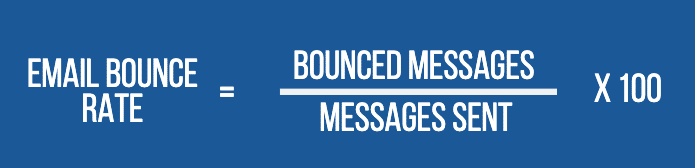
As an example: if you sent 1000 messages, and 10 of those bounced, 10/1000 = 0.01. Multiply this by 100, and you have your bounce rate: 1%.
What is a Good Email Bounce Rate?
As a rough rule of thumb, a bounce rate below 2% suggests a reasonably clean list. If it goes above 2.5–3%, it’s time to work out what’s going wrong.
Honestly though, the more useful comparison is with yourself. On a list you mail regularly, bounce rates should be steady from one send to the next, because hard bounces get removed the first time. A sudden jump almost always has a specific cause, and that’s what to chase, rather than how you compare with an industry average.
How To Avoid a High Email Bounce Rate
There are a number of things you can do to ensure your email bounce rate stays within a healthy range.
1. Always Use Confirmed Opt-In
Confirmed opt-in (or double opt-in) is the best way to collect valid email addresses. This is because you’ve asked the subscriber to click on a link in a confirmation message, so you know their email address is correct. Gathering this additional validation also ensures that subscribers actually want to receive your newsletter.
2. Clean Your List Often
Every decent ESP will have in-built features that allow you to easily clean your list. For example, removing inactive email addresses, or removing recipients who have been inactive for a certain amount of time. You can usually choose to set up an automation to remove inactive subscribers, or you can remove them manually every few months.
3. Avoid Scraped and Purchased Email Lists
Importing scraped and purchased email lists into most ESPs is against their terms and conditions. Additionally, these kinds of lists are often extremely low quality, resulting in high bounce rates that could seriously harm your Sender Score. Avoid them at all costs.
4. Run Giveaways and Competitions Carefully
You may think that running a giveaway to encourage people to sign up to your newsletter is a great way to build your list. But most people who want to enter a giveaway don’t want to sign up to your newsletter. Therefore, they often sign up with non-existent, or single-use email addresses that offer you no value whatsoever. If you do use incentives to attract sign-ups, be up front about what you’re offering. Ensure your prizes are highly relevant to your ideal subscribers. And let people know they can unsubscribe at any time.
5. Avoid Free Domain Send-From Addresses
Instead of sending messages from free @gmail or @outlook addresses, you should always use a send-from address at your own domain. This will make it much less likely your messages will bounce, or end up in the spam folder.
6. Authenticate Your Send-From Address
Make sure your sending domain is properly authenticated with SPF, DKIM and DMARC, set up on your own domain rather than your ESP’s. Gmail and Yahoo have required this from bulk senders since February 2024, and Microsoft followed for Outlook.com in May 2025. Your ESP’s documentation will walk you through the DNS records.
7. Have a Consistent Schedule
Ensure your messages are expected by both your subscribers and their servers by keeping to a relatively consistent schedule. This will prevent your list from going stale, and will reduce the chance of subscribers forgetting they subscribed, and thereby marking your messages as spam, or submitting a complaint against your address.
8. Use Re-Engagement Campaigns
When subscribers stop clicking your messages, try to re-engage them with a targeted campaign that sends tailored messages aimed at getting cold subscribers to become active again. If they don’t respond, it’s time to remove them. Use clicks rather than opens to judge this, because Apple Mail Privacy Protection makes a lot of opens automatic.
9. Include a Preferences Link in Messages
At the bottom of each of your messages, make sure there is a link that takes subscribers to their preferences page where they can update their email address, and opt in and out of certain kind of emails. This will help you to build a more loyal, up-to-date mailing list that’ll stay relevant for much longer.
10. Keep a Close Eye on Results
Catching bounce rate issues sooner rather than later is extremely important. Leave it too long, and the damage can be difficult to repair. So, keep a close eye on your bounce rates for each campaign you send. Look out for large increases, then do the detective work to figure out what might have happened, and fix the problem before it gets worse.
11. Take Care With Dormant Lists
If you’re about to start sending messages to a large list that hasn’t received a message from you in a long time, be careful. Send messages out in small batches, to different segments of the list. This will allow you to check that bounce rate isn’t too high. If it is, then the list needs cleansing before sending a message out to everyone.
Solving Email Bounce Rate Woes
Bounces are a normal part of sending email. What matters is noticing when they change, and working out why, before a small problem becomes a reputation problem.
Keep your list clean, authenticate properly, and read the bounce codes when something looks off. That covers most of it.
References
- [1] sender requirements — support.google.com